Thursday, March 24, 2016

ORA-01017: invalid username/password; logon denied

I was setting up standby database in RAC environment. Obviously my first step was to clone the primary database as a single instance  in standby RAC node.

I tried to connect the target database  from auxiliary database and getting below error.

Target database(RACTEST1) = Primary database
Auxiliary database(RACTEST4)  = The location where we clone the database.

[oracle@RACTEST4 usben]$ sqlplus sys/admin123@usben as sysdba

SQL*Plus: Release 12.1.0.2.0 Production on Thu Mar 24 22:25:33 2016

Copyright (c) 1982, 2014, Oracle.  All rights reserved.

ERROR:
ORA-01017: invalid username/password; logon denied


Enter user-name:

Here is the tnsentry for usben


usben =
  (DESCRIPTION =
    (ADDRESS = (PROTOCOL = TCP)(HOST = ractest1.localdomain)(PORT = 1521))
    (CONNECT_DATA =
      (SERVER = DEDICATED)
      (SERVICE_NAME = usben.localdomain)
    )
  )

hmmm...  It is interesting!  The password is correct. Why it is failing?

After more research, i found the solution.

The password file is on local file system on RAC environment.  Starting Oracle12c, it should be in ASM storage centralized location.

Created the password file on ASM disk as below.

[oracle@RACTEST1 dbs]$ orapwd file='+DATA/USBEN/PASSWORDFILE/orapwusben' entries=10 dbuniquename=usben password=admin123
[oracle@RACTEST1 dbs]$

Let me try to connect the target database again on auxiliary instance.


[oracle@RACTEST4 ~]$ sqlplus sys/admin123@usben as sysdba

SQL*Plus: Release 12.1.0.2.0 Production on Thu Mar 24 23:48:48 2016

Copyright (c) 1982, 2014, Oracle.  All rights reserved.


Connected to:
Oracle Database 12c Enterprise Edition Release 12.1.0.2.0 - 64bit Production
With the Partitioning, Real Application Clusters, Automatic Storage Management, OLAP,
Advanced Analytics and Real Application Testing options

SQL>


Perfect. The issue is resolved after moving the password file to ASM disk!

Hope this post helps!

Thursday, March 17, 2016

Prerequisite check for Oracle12c RAC Cluster Installation

I am about to install Oracle12c Cluster on two node RAC. I am checking all the prerequisite before i start the cluster installation. I thought, i might be helpful for others if i post the things to be checked before we start installing the cluster software.

The RAC nodes are already built and ready to install the cluster.  My hostnames are ractest4 & racttest5.

Here is my ip info.


Step 1 :  Make sure you have either root password or Oracle account with sudo to root privileges to install cluster software. It ask to enter the password in the middle of the installation. I carry root password for my installation.


Step 2 :  Make sure  you are able to ping public ip and private ip between two nodes.

Public IP 
[oracle@RACTEST4 grid]$ ping 192.168.56.212
PING 192.168.56.212 (192.168.56.212) 56(84) bytes of data.
64 bytes from 192.168.56.212: icmp_seq=1 ttl=64 time=1.49 ms
64 bytes from 192.168.56.212: icmp_seq=2 ttl=64 time=0.416 ms
64 bytes from 192.168.56.212: icmp_seq=3 ttl=64 time=0.411 ms
64 bytes from 192.168.56.212: icmp_seq=4 ttl=64 time=0.479 ms
^C
--- 192.168.56.212 ping statistics ---
4 packets transmitted, 4 received, 0% packet loss, time 3362ms
rtt min/avg/max/mdev = 0.411/0.699/1.493/0.459 ms
[oracle@RACTEST4 grid]$

[root@RACTEST5 ~]#  ping 192.168.56.211
PING 192.168.56.211 (192.168.56.211) 56(84) bytes of data.
64 bytes from 192.168.56.211: icmp_seq=1 ttl=64 time=0.324 ms
64 bytes from 192.168.56.211: icmp_seq=2 ttl=64 time=0.425 ms
64 bytes from 192.168.56.211: icmp_seq=3 ttl=64 time=0.468 ms
64 bytes from 192.168.56.211: icmp_seq=4 ttl=64 time=0.436 ms
^C
--- 192.168.56.211 ping statistics ---
4 packets transmitted, 4 received, 0% packet loss, time 3469ms
rtt min/avg/max/mdev = 0.324/0.413/0.468/0.055 ms
[root@RACTEST5 ~]#

Private IP 
[oracle@RACTEST4 grid]$ ping 192.168.1.212
PING 192.168.1.212 (192.168.1.212) 56(84) bytes of data.
64 bytes from 192.168.1.212: icmp_seq=1 ttl=64 time=0.387 ms
64 bytes from 192.168.1.212: icmp_seq=2 ttl=64 time=0.403 ms
64 bytes from 192.168.1.212: icmp_seq=3 ttl=64 time=0.384 ms
64 bytes from 192.168.1.212: icmp_seq=4 ttl=64 time=0.410 ms
^C
--- 192.168.1.212 ping statistics ---
4 packets transmitted, 4 received, 0% packet loss, time 3245ms
rtt min/avg/max/mdev = 0.384/0.396/0.410/0.010 ms
[oracle@RACTEST4 grid]$

[root@RACTEST5 ~]# ping 192.168.1.211
PING 192.168.1.211 (192.168.1.211) 56(84) bytes of data.
64 bytes from 192.168.1.211: icmp_seq=1 ttl=64 time=1.76 ms
64 bytes from 192.168.1.211: icmp_seq=2 ttl=64 time=0.443 ms
64 bytes from 192.168.1.211: icmp_seq=3 ttl=64 time=0.348 ms
^C
--- 192.168.1.211 ping statistics ---
3 packets transmitted, 3 received, 0% packet loss, time 2393ms
rtt min/avg/max/mdev = 0.348/0.853/1.768/0.648 ms
[root@RACTEST5 ~]#

 Step 3 :  Make sure you see the ASM disk on both the nodes.
[root@RACTEST4 ~]# oracleasm listdisks
DISK1
[root@RACTEST4 ~]#
[root@RACTEST5 ~]# oracleasm listdisks
DISK1
[root@RACTEST5 ~]#

 Step 4 :  Run the cluster verification utility. The runcluvfy.sh script found in the grid directory, the same directory where you find runinstaller. This utility helps resolve problems before running runInstaller script.

runcluvfy.sh stage -pre crsinst -n ractest4,ractest5

By default the CVU reports in non verbose mode by only reporting the summary of a test, we can obtain detailed output by using the -verbose argument. The -verbose argument produces detailed output of individual checks and where applicable shows results for each node in a tabular layout.

runcluvfy.sh stage -pre crsinst -n ractest4,ractest5 -verbose

[oracle@RACTEST4 grid]$ ls -l runcluvfy.sh
-rwxr-xr-x. 1 root root 5085 Dec 20  2013 runcluvfy.sh
[oracle@RACTEST4 grid]$ ./runcluvfy.sh stage -pre crsinst -n ractest4,ractest5

Performing pre-checks for cluster services setup

Checking node reachability...
Node reachability check passed from node "ractest4"


Checking user equivalence...
PRVG-2019 : Check for equivalence of user "oracle" from node "ractest4" to node "ractest5" failed

PRKC-1044 : Failed to check remote command execution setup for node ractest5 using shells /usr/bin/ssh and /usr/bin/rsh
File "/usr/bin/rsh" does not exist on node "ractest5"
No RSA host key is known for ractest5 and you have requested strict checking.Host key verification failed.
PRVG-2019 : Check for equivalence of user "oracle" from node "ractest4" to node "ractest4" failed

PRKC-1044 : Failed to check remote command execution setup for node ractest4 using shells /usr/bin/ssh and /usr/bin/rsh
File "/usr/bin/rsh" does not exist on node "ractest4"
No RSA host key is known for ractest4 and you have requested strict checking.Host key verification failed.

ERROR:
User equivalence unavailable on all the specified nodes
Verification cannot proceed


Pre-check for cluster services setup was unsuccessful on all the nodes.
[oracle@RACTEST4 grid]$


It seems ssh is not setup between two nodes. Let me setup the ssh. 

Step 5 :  Setup the ssh between two nodes.

Login to sshsetup directory and run the below commands. My sshsetup location is /backup/software/cluster/grid/sshsetup

./sshUserSetup.sh -user oracle -hosts "ractest4 ractest5" -noPromptPassphrase 

[oracle@RACTEST4 sshsetup]$ ./sshUserSetup.sh -user oracle -hosts "ractest4 ractest5" -noPromptPassphrase
The output of this script is also logged into /tmp/sshUserSetup_2016-03-17-09-19-03.log
Hosts are ractest4 ractest5
user is oracle
Platform:- Linux
Checking if the remote hosts are reachable
PING RACTEST4.localdomain (192.168.56.211) 56(84) bytes of data.
64 bytes from RACTEST4.localdomain (192.168.56.211): icmp_seq=1 ttl=64 time=0.012 ms
64 bytes from RACTEST4.localdomain (192.168.56.211): icmp_seq=2 ttl=64 time=0.032 ms
64 bytes from RACTEST4.localdomain (192.168.56.211): icmp_seq=3 ttl=64 time=0.029 ms
64 bytes from RACTEST4.localdomain (192.168.56.211): icmp_seq=4 ttl=64 time=0.030 ms
64 bytes from RACTEST4.localdomain (192.168.56.211): icmp_seq=5 ttl=64 time=0.029 ms

--- RACTEST4.localdomain ping statistics ---
5 packets transmitted, 5 received, 0% packet loss, time 3999ms
rtt min/avg/max/mdev = 0.012/0.026/0.032/0.008 ms
PING RACTEST5.localdomain (192.168.56.212) 56(84) bytes of data.
64 bytes from RACTEST5.localdomain (192.168.56.212): icmp_seq=1 ttl=64 time=0.382 ms
64 bytes from RACTEST5.localdomain (192.168.56.212): icmp_seq=2 ttl=64 time=0.407 ms
64 bytes from RACTEST5.localdomain (192.168.56.212): icmp_seq=3 ttl=64 time=0.371 ms
64 bytes from RACTEST5.localdomain (192.168.56.212): icmp_seq=4 ttl=64 time=0.418 ms
64 bytes from RACTEST5.localdomain (192.168.56.212): icmp_seq=5 ttl=64 time=0.416 ms

--- RACTEST5.localdomain ping statistics ---
5 packets transmitted, 5 received, 0% packet loss, time 4001ms
rtt min/avg/max/mdev = 0.371/0.398/0.418/0.031 ms
Remote host reachability check succeeded.
The following hosts are reachable: ractest4 ractest5.
The following hosts are not reachable: .
All hosts are reachable. Proceeding further...
firsthost ractest4
numhosts 2
The script will setup SSH connectivity from the host RACTEST4.localdomain to all
the remote hosts. After the script is executed, the user can use SSH to run
commands on the remote hosts or copy files between this host RACTEST4.localdomain
and the remote hosts without being prompted for passwords or confirmations.

NOTE 1:
As part of the setup procedure, this script will use ssh and scp to copy
files between the local host and the remote hosts. Since the script does not
store passwords, you may be prompted for the passwords during the execution of
the script whenever ssh or scp is invoked.

NOTE 2:
AS PER SSH REQUIREMENTS, THIS SCRIPT WILL SECURE THE USER HOME DIRECTORY
AND THE .ssh DIRECTORY BY REVOKING GROUP AND WORLD WRITE PRIVILEDGES TO THESE
directories.

Do you want to continue and let the script make the above mentioned changes (yes/no)?
yes

The user chose yes
User chose to skip passphrase related questions.
Creating .ssh directory on local host, if not present already
Creating authorized_keys file on local host
Changing permissions on authorized_keys to 644 on local host
Creating known_hosts file on local host
Changing permissions on known_hosts to 644 on local host
Creating config file on local host
If a config file exists already at /home/oracle/.ssh/config, it would be backed up to /home/oracle/.ssh/config.backup.
Removing old private/public keys on local host
Running SSH keygen on local host with empty passphrase
Generating public/private rsa key pair.
Your identification has been saved in /home/oracle/.ssh/id_rsa.
Your public key has been saved in /home/oracle/.ssh/id_rsa.pub.
The key fingerprint is:
94:de:17:5e:0e:08:fb:3f:eb:6f:f8:0f:3f:3f:6e:f2 oracle@RACTEST4.localdomain
The key's randomart image is:
+--[ RSA 1024]----+
|        .        |
|         + .     |
|        + . o .  |
|       o o . =   |
|        S o o .  |
|           o     |
|            o..  |
|            .+.* |
|           .o+BEB|
+-----------------+
Creating .ssh directory and setting permissions on remote host ractest4
THE SCRIPT WOULD ALSO BE REVOKING WRITE PERMISSIONS FOR group AND others ON THE HOME DIRECTORY FOR oracle. THIS IS AN SSH REQUIREMENT.
The script would create ~oracle/.ssh/config file on remote host ractest4. If a config file exists already at ~oracle/.ssh/config, it would be backed up to ~oracle/.ssh/config.backup.
The user may be prompted for a password here since the script would be running SSH on host ractest4.
Warning: Permanently added 'ractest4,192.168.56.211' (RSA) to the list of known hosts.
oracle@ractest4's password:
Done with creating .ssh directory and setting permissions on remote host ractest4.
Creating .ssh directory and setting permissions on remote host ractest5
THE SCRIPT WOULD ALSO BE REVOKING WRITE PERMISSIONS FOR group AND others ON THE HOME DIRECTORY FOR oracle. THIS IS AN SSH REQUIREMENT.
The script would create ~oracle/.ssh/config file on remote host ractest5. If a config file exists already at ~oracle/.ssh/config, it would be backed up to ~oracle/.ssh/config.backup.
The user may be prompted for a password here since the script would be running SSH on host ractest5.
Warning: Permanently added 'ractest5,192.168.56.212' (RSA) to the list of known hosts.
oracle@ractest5's password:
Done with creating .ssh directory and setting permissions on remote host ractest5.
Copying local host public key to the remote host ractest4
The user may be prompted for a password or passphrase here since the script would be using SCP for host ractest4.
oracle@ractest4's password:
Done copying local host public key to the remote host ractest4
Copying local host public key to the remote host ractest5
The user may be prompted for a password or passphrase here since the script would be using SCP for host ractest5.
oracle@ractest5's password:
Done copying local host public key to the remote host ractest5
cat: /home/oracle/.ssh/known_hosts.tmp: No such file or directory
cat: /home/oracle/.ssh/authorized_keys.tmp: No such file or directory
SSH setup is complete.

------------------------------------------------------------------------
Verifying SSH setup
===================
The script will now run the date command on the remote nodes using ssh
to verify if ssh is setup correctly. IF THE SETUP IS CORRECTLY SETUP,
THERE SHOULD BE NO OUTPUT OTHER THAN THE DATE AND SSH SHOULD NOT ASK FOR
PASSWORDS. If you see any output other than date or are prompted for the
password, ssh is not setup correctly and you will need to resolve the
issue and set up ssh again.
The possible causes for failure could be:
1. The server settings in /etc/ssh/sshd_config file do not allow ssh
for user oracle.
2. The server may have disabled public key based authentication.
3. The client public key on the server may be outdated.
4. ~oracle or ~oracle/.ssh on the remote host may not be owned by oracle.
5. User may not have passed -shared option for shared remote users or
may be passing the -shared option for non-shared remote users.
6. If there is output in addition to the date, but no password is asked,
it may be a security alert shown as part of company policy. Append the
additional text to the /sysman/prov/resources/ignoreMessages.txt file.
------------------------------------------------------------------------
--ractest4:--
Running /usr/bin/ssh -x -l oracle ractest4 date to verify SSH connectivity has been setup from local host to ractest4.
IF YOU SEE ANY OTHER OUTPUT BESIDES THE OUTPUT OF THE DATE COMMAND OR IF YOU ARE PROMPTED FOR A PASSWORD HERE, IT MEANS SSH SETUP HAS NOT BEEN SUCCESSFUL. Please note that being prompted for a passphrase may be OK but being prompted for a password is ERROR.
Thu Mar 17 09:21:15 EDT 2016
------------------------------------------------------------------------
--ractest5:--
Running /usr/bin/ssh -x -l oracle ractest5 date to verify SSH connectivity has been setup from local host to ractest5.
IF YOU SEE ANY OTHER OUTPUT BESIDES THE OUTPUT OF THE DATE COMMAND OR IF YOU ARE PROMPTED FOR A PASSWORD HERE, IT MEANS SSH SETUP HAS NOT BEEN SUCCESSFUL. Please note that being prompted for a passphrase may be OK but being prompted for a password is ERROR.
Thu Mar 17 09:21:15 EDT 2016
------------------------------------------------------------------------
SSH verification complete.
[oracle@RACTEST4 sshsetup]$

Step 6 :  Re run the runcluvfy.sh again and see any issues.
[oracle@RACTEST4 grid]$  ./runcluvfy.sh stage -pre crsinst -n ractest4,ractest5

Performing pre-checks for cluster services setup

Checking node reachability...
Node reachability check passed from node "ractest4"


Checking user equivalence...
User equivalence check passed for user "oracle"

Checking node connectivity...

Checking hosts config file...

Verification of the hosts config file successful

Node connectivity passed for subnet "192.168.56.0" with node(s) ractest5,ractest4
TCP connectivity check passed for subnet "192.168.56.0"

Node connectivity passed for subnet "192.168.1.0" with node(s) ractest5,ractest4
TCP connectivity check passed for subnet "192.168.1.0"


Interfaces found on subnet "192.168.56.0" that are likely candidates for VIP are:
ractest5 eth0:192.168.56.212
ractest4 eth0:192.168.56.211

Interfaces found on subnet "192.168.1.0" that are likely candidates for a private interconnect are:
ractest5 eth3:192.168.1.212
ractest4 eth1:192.168.1.211

WARNING:
Could not find a suitable set of interfaces with the same name for the private interconnect
Checking subnet mask consistency...
Subnet mask consistency check passed for subnet "192.168.56.0".
Subnet mask consistency check passed for subnet "192.168.1.0".
Subnet mask consistency check passed.

Node connectivity check passed

Checking multicast communication...

Checking subnet "192.168.56.0" for multicast communication with multicast group "224.0.0.251"...
Check of subnet "192.168.56.0" for multicast communication with multicast group "224.0.0.251" passed.

Check of multicast communication passed.

Checking ASMLib configuration.
Check for ASMLib configuration passed.
Total memory check failed
Check failed on nodes:
        ractest5,ractest4
Available memory check passed
Swap space check passed
Free disk space check passed for "ractest5:/usr,ractest5:/var,ractest5:/etc,ractest5:/sbin,ractest5:/tmp"
Free disk space check passed for "ractest4:/usr,ractest4:/var,ractest4:/etc,ractest4:/sbin,ractest4:/tmp"
Check for multiple users with UID value 60321 passed
User existence check passed for "oracle"
Group existence check passed for "oinstall"
Group existence check passed for "dba"
Membership check for user "oracle" in group "oinstall" [as Primary] passed
Membership check for user "oracle" in group "dba" passed
Run level check passed
Hard limits check passed for "maximum open file descriptors"
Soft limits check passed for "maximum open file descriptors"
Hard limits check passed for "maximum user processes"
Soft limits check passed for "maximum user processes"
System architecture check passed
Kernel version check passed
Kernel parameter check passed for "semmsl"
Kernel parameter check passed for "semmns"
Kernel parameter check passed for "semopm"
Kernel parameter check passed for "semmni"
Kernel parameter check passed for "shmmax"
Kernel parameter check passed for "shmmni"
Kernel parameter check passed for "shmall"
Kernel parameter check passed for "file-max"
Kernel parameter check passed for "ip_local_port_range"
Kernel parameter check passed for "rmem_default"
Kernel parameter check passed for "rmem_max"
Kernel parameter check passed for "wmem_default"
Kernel parameter check passed for "wmem_max"
Kernel parameter check passed for "aio-max-nr"

PRVG-1206 : Check cannot be performed for configured value of kernel parameter "panic_on_oops" on node "ractest5"
PRVG-1206 : Check cannot be performed for configured value of kernel parameter "panic_on_oops" on node "ractest4"

Kernel parameter check passed for "panic_on_oops"
Package existence check passed for "binutils"
Package existence check passed for "compat-libcap1"
Package existence check passed for "compat-libstdc++-33(x86_64)"
Package existence check passed for "libgcc(x86_64)"
Package existence check passed for "libstdc++(x86_64)"
Package existence check passed for "libstdc++-devel(x86_64)"
Package existence check passed for "sysstat"
Package existence check passed for "gcc"
Package existence check passed for "gcc-c++"
Package existence check passed for "ksh"
Package existence check passed for "make"
Package existence check passed for "glibc(x86_64)"
Package existence check passed for "glibc-devel(x86_64)"
Package existence check passed for "libaio(x86_64)"
Package existence check passed for "libaio-devel(x86_64)"
Package existence check passed for "nfs-utils"

Checking availability of ports "6200,6100" required for component "Oracle Notification Service (ONS)"
Port availability check passed for ports "6200,6100"

Checking availability of ports "42424" required for component "Oracle Cluster Synchronization Services (CSSD)"
Port availability check passed for ports "42424"
Check for multiple users with UID value 0 passed
Current group ID check passed

Starting check for consistency of primary group of root user

Check for consistency of root user's primary group passed

Starting Clock synchronization checks using Network Time Protocol(NTP)...
NTP configuration file "/etc/ntp.conf" existence check passed
No NTP Daemons or Services were found to be running
PRVF-5507 : NTP daemon or service is not running on any node but NTP configuration file exists on the following node(s):
ractest5,ractest4
Clock synchronization check using Network Time Protocol(NTP) failed

Core file name pattern consistency check passed.

User "oracle" is not part of "root" group. Check passed
Default user file creation mask check passed
Checking integrity of file "/etc/resolv.conf" across nodes

"domain" and "search" entries do not coexist in any "/etc/resolv.conf" file
All nodes have same "search" order defined in file "/etc/resolv.conf"
The DNS response time for an unreachable node is within acceptable limit on all nodes

Check for integrity of file "/etc/resolv.conf" passed

Time zone consistency check passed

Checking integrity of name service switch configuration file "/etc/nsswitch.conf" ...
All nodes have same "hosts" entry defined in file "/etc/nsswitch.conf"
Check for integrity of name service switch configuration file "/etc/nsswitch.conf" passed


Checking daemon "avahi-daemon" is not configured and running
Daemon not configured check passed for process "avahi-daemon"
Daemon not running check passed for process "avahi-daemon"

Starting check for /dev/shm mounted as temporary file system ...

Check for /dev/shm mounted as temporary file system passed

Starting check for /boot mount ...

Check for /boot mount passed

Starting check for zeroconf check ...

ERROR:

PRVE-10077 : NOZEROCONF parameter was not  specified or was not set to 'yes' in file "/etc/sysconfig/network" on node "RACTEST5.localdomain"
PRVE-10077 : NOZEROCONF parameter was not  specified or was not set to 'yes' in file "/etc/sysconfig/network" on node "RACTEST4.localdomain"

Check for zeroconf check failed

Pre-check for cluster services setup was unsuccessful on all the nodes.
[oracle@RACTEST4 grid]$

Now ssh issue resolved!  but still there are four more issues appeared.

Issue 1
The /etc/udev/rules.d/70-persistent-net.rules file has some incorrect naming convention. I fixed this file.

WARNING:
Could not find a suitable set of interfaces with the same name for the private interconnect

Issue 2
Added below entry in /etc/sysctl.conf file on both node 
kernel.panic_on_oops = 1

Run the sysctl -p on both nodes.

PRVG-1206 : Check cannot be performed for configured value of kernel parameter "panic_on_oops" on node "ractest5"
PRVG-1206 : Check cannot be performed for configured value of kernel parameter "panic_on_oops" on node "ractest4"

Issue 3The below issue  can be ignored. Since we are configuring  NTP protocol.  CSSD will take care of time synchronization. 

Clock synchronization check using Network Time Protocol(NTP) failed

Issue 4
Added below entry in /etc/sysconfig/network file on both nodes and restart the network service.
NOZEROCONF=yes


ERROR:
PRVE-10077 : NOZEROCONF parameter was not  specified or was not set to 'yes' in file "/etc/sysconfig/network" on node "RACTEST5.localdomain"
PRVE-10077 : NOZEROCONF parameter was not  specified or was not set to 'yes' in file "/etc/sysconfig/network" on node "RACTEST4.localdomain"

Check for zeroconf check failed

Step 7 :  Re run the runcluvfy.sh again and see any issues.
[oracle@RACTEST4 grid]$ ./runcluvfy.sh stage -pre crsinst -n ractest4,ractest5

Performing pre-checks for cluster services setup

Checking node reachability...
Node reachability check passed from node "ractest4"


Checking user equivalence...
User equivalence check passed for user "oracle"

Checking node connectivity...

Checking hosts config file...

Verification of the hosts config file successful

Node connectivity passed for subnet "192.168.56.0" with node(s) ractest5,ractest4
TCP connectivity check passed for subnet "192.168.56.0"

Node connectivity passed for subnet "192.168.1.0" with node(s) ractest5,ractest4
TCP connectivity check passed for subnet "192.168.1.0"


Interfaces found on subnet "192.168.56.0" that are likely candidates for VIP are:
ractest5 eth0:192.168.56.212
ractest4 eth0:192.168.56.211

Interfaces found on subnet "192.168.1.0" that are likely candidates for a private interconnect are:
ractest5 eth1:192.168.1.212
ractest4 eth1:192.168.1.211
Checking subnet mask consistency...
Subnet mask consistency check passed for subnet "192.168.56.0".
Subnet mask consistency check passed for subnet "192.168.1.0".
Subnet mask consistency check passed.

Node connectivity check passed

Checking multicast communication...

Checking subnet "192.168.56.0" for multicast communication with multicast group "224.0.0.251"...
Check of subnet "192.168.56.0" for multicast communication with multicast group "224.0.0.251" passed.

Check of multicast communication passed.

Checking ASMLib configuration.
Check for ASMLib configuration passed.
Total memory check failed
Check failed on nodes:
        ractest5,ractest4
Available memory check passed
Swap space check passed
Free disk space check passed for "ractest5:/usr,ractest5:/var,ractest5:/etc,ractest5:/sbin,ractest5:/tmp"
Free disk space check passed for "ractest4:/usr,ractest4:/var,ractest4:/etc,ractest4:/sbin,ractest4:/tmp"
Check for multiple users with UID value 60321 passed
User existence check passed for "oracle"
Group existence check passed for "oinstall"
Group existence check passed for "dba"
Membership check for user "oracle" in group "oinstall" [as Primary] passed
Membership check for user "oracle" in group "dba" passed
Run level check passed
Hard limits check passed for "maximum open file descriptors"
Soft limits check passed for "maximum open file descriptors"
Hard limits check passed for "maximum user processes"
Soft limits check passed for "maximum user processes"
System architecture check passed
Kernel version check passed
Kernel parameter check passed for "semmsl"
Kernel parameter check passed for "semmns"
Kernel parameter check passed for "semopm"
Kernel parameter check passed for "semmni"
Kernel parameter check passed for "shmmax"
Kernel parameter check passed for "shmmni"
Kernel parameter check passed for "shmall"
Kernel parameter check passed for "file-max"
Kernel parameter check passed for "ip_local_port_range"
Kernel parameter check passed for "rmem_default"
Kernel parameter check passed for "rmem_max"
Kernel parameter check passed for "wmem_default"
Kernel parameter check passed for "wmem_max"
Kernel parameter check passed for "aio-max-nr"
Kernel parameter check passed for "panic_on_oops"
Package existence check passed for "binutils"
Package existence check passed for "compat-libcap1"
Package existence check passed for "compat-libstdc++-33(x86_64)"
Package existence check passed for "libgcc(x86_64)"
Package existence check passed for "libstdc++(x86_64)"
Package existence check passed for "libstdc++-devel(x86_64)"
Package existence check passed for "sysstat"
Package existence check passed for "gcc"
Package existence check passed for "gcc-c++"
Package existence check passed for "ksh"
Package existence check passed for "make"
Package existence check passed for "glibc(x86_64)"
Package existence check passed for "glibc-devel(x86_64)"
Package existence check passed for "libaio(x86_64)"
Package existence check passed for "libaio-devel(x86_64)"
Package existence check passed for "nfs-utils"

Checking availability of ports "6200,6100" required for component "Oracle Notification Service (ONS)"
Port availability check passed for ports "6200,6100"

Checking availability of ports "42424" required for component "Oracle Cluster Synchronization Services (CSSD)"
Port availability check passed for ports "42424"
Check for multiple users with UID value 0 passed
Current group ID check passed

Starting check for consistency of primary group of root user

Check for consistency of root user's primary group passed

Starting Clock synchronization checks using Network Time Protocol(NTP)...
NTP configuration file "/etc/ntp.conf" existence check passed
No NTP Daemons or Services were found to be running
PRVF-5507 : NTP daemon or service is not running on any node but NTP configuration file exists on the following node(s):
ractest5,ractest4
Clock synchronization check using Network Time Protocol(NTP) failed

Core file name pattern consistency check passed.

User "oracle" is not part of "root" group. Check passed
Default user file creation mask check passed
Checking integrity of file "/etc/resolv.conf" across nodes

"domain" and "search" entries do not coexist in any "/etc/resolv.conf" file
All nodes have same "search" order defined in file "/etc/resolv.conf"
The DNS response time for an unreachable node is within acceptable limit on all nodes

Check for integrity of file "/etc/resolv.conf" passed

Time zone consistency check passed

Checking integrity of name service switch configuration file "/etc/nsswitch.conf" ...
All nodes have same "hosts" entry defined in file "/etc/nsswitch.conf"
Check for integrity of name service switch configuration file "/etc/nsswitch.conf" passed


Checking daemon "avahi-daemon" is not configured and running
Daemon not configured check passed for process "avahi-daemon"
Daemon not running check passed for process "avahi-daemon"

Starting check for /dev/shm mounted as temporary file system ...

Check for /dev/shm mounted as temporary file system passed

Starting check for /boot mount ...

Check for /boot mount passed

Starting check for zeroconf check ...

Check for zeroconf check passed

Pre-check for cluster services setup was unsuccessful on all the nodes.
[oracle@RACTEST4 grid]$


Now all set!  It is ready to start installing the cluster software!

During the cluster software installation,  i found cvuqdisk  package missing.


The package is existing in software location under grid/rpm directory. I installed this package on both nodes.

[root@RACTEST4 rpm]# pwd
/backup/software/cluster/grid/rpm
[root@RACTEST4 rpm]# rpm -ivh cvuqdisk-1.0.9-1.rpm
Preparing...                ########################################### [100%]
Using default group oinstall to install package
   1:cvuqdisk               ########################################### [100%]
[root@RACTEST4 rpm]#

[root@RACTEST5 cluster]# rpm -ivh cvuqdisk-1.0.9-1.rpm
Preparing...                ########################################### [100%]
Using default group oinstall to install package
   1:cvuqdisk               ########################################### [100%]
[root@RACTEST5 cluster]#

Again i clicked Check Again button and now the issue is disappeared.


I am not worried about physical memory now..  NTP protocol can be ignored. since CSSD will take care of time synchronization.

We are good now!!!

Tuesday, February 9, 2016

Step by Step rman restore to different host with ASM Migration

This post is about  RMAN restore from one host to another host. The database  will be migrated from file system to ASM disk as part of the restore.  There may be tons of post for RMAN restore. But i am not finding the detail level document for RMAN restore with ASM migration. I hope, this fills up the gap and useful  for others. This post is tested in Oracle 12c(12.1.0.2.0).

This post could be useful for the following circumstance.

1. The production database server is crashed and no Data Guard standby.
2. You need to test some of the bugs in test database with current production  image.
3. Migrating the database from  file system to ASM disk in new hardware.

I am going to call target database(the place where i am restoring) as auxiliary database,  source database as target database.

Here are the high level steps :

1. Backup the database in target database server. We can  also use recent L0 backup in the tape.
2. FTP the RMAN backups and password file  to auxiliary server
3. Restore the SPFILE,
4. Start the instance with nomount mode
5. Restore the control file
6. Mount the database
7. Restore  the database
8. Recover  the database  and  apply  new archive log files
9. Open the database
10. Create the temp file
11. Create spfile on ASM disk
12. Database verification and validation.

Target  DB info :


I am restoring the above database to the new host called ractest1. The RBDMS is already installed in ractest1 host and it is same as target database version.

Step1  I am using recent RMAN L0 backup  and Archive log backup in target server. I am using the below script to backup the database in target server. We can also use the recent full backup from tape if it is already available in tape. I am using disk backup for my convenience. 

usben_L0_backup.sh


Here is the log file for full backup.

RMAN>
connected to target database: USBEN (DBID=2379284599)

RMAN> 2> 3> 4> 5> 6> 7> 8> 9> 10> 11> 12>
using target database control file instead of recovery catalog
allocated channel: T01
channel T01: SID=61 device type=DISK

executing command: SET COMMAND ID

Starting backup at 16-FEB-16
channel T01: starting full datafile backup set
channel T01: specifying datafile(s) in backup set
including current SPFILE in backup set
channel T01: starting piece 1 at 16-FEB-16
channel T01: finished piece 1 at 16-FEB-16
piece handle=/backup/usben/USBEN_SPFILE_20160216_0927_133_45qu2cfv_1_1_903950847 tag=USBEN_L0_20160216_0927 comment=NONE
channel T01: backup set complete, elapsed time: 00:00:01
Finished backup at 16-FEB-16

Starting backup at 16-FEB-16
channel T01: starting full datafile backup set
channel T01: specifying datafile(s) in backup set
including current control file in backup set
channel T01: starting piece 1 at 16-FEB-16
channel T01: finished piece 1 at 16-FEB-16
piece handle=/backup/usben/USBEN_CTRL_20160216_0927_134_46qu2cg0_1_1_903950848 tag=USBEN_L0_20160216_0927 comment=NONE
channel T01: backup set complete, elapsed time: 00:00:01
Finished backup at 16-FEB-16

Starting backup at 16-FEB-16
channel T01: starting compressed incremental level 0 datafile backup set
channel T01: specifying datafile(s) in backup set
input datafile file number=00001 name=/data01/oradata/usben/system01.dbf
-- trimming the info here for brevity
input datafile file number=00003 name=/data01/oradata/usben/sysaux01.dbf
channel T01: starting piece 1 at 16-FEB-16
channel T01: finished piece 1 at 16-FEB-16
piece handle=/backup/usben/USBEN_L0_20160216_0927_135_47qu2cg3_1_1_903950851 tag=USBEN_L0_20160216_0927 comment=NONE
channel T01: backup set complete, elapsed time: 00:02:15
Finished backup at 16-FEB-16

Starting Control File and SPFILE Autobackup at 16-FEB-16
piece handle=/ora/app/oracle/fast_recovery_area/USBEN/
autobackup/2016_02_16/o1_mf_s_903950986_cd6dltf7_.bkp comment=NONE
Finished Control File and SPFILE Autobackup at 16-FEB-16
released channel: T01
RMAN>
Recovery Manager complete.


usben_Arch_backup.sh


Here is the log file for archive log backup.

RMAN>
connected to target database: USBEN (DBID=2379284599)

RMAN> 2> 3> 4> 5> 6> 7> 8> 9> 10>
using target database control file instead of recovery catalog
allocated channel: T01
channel T01: SID=59 device type=DISK

executing command: SET COMMAND ID

sql statement: alter system archive log current

Starting backup at 16-FEB-16
current log archived
channel T01: starting archived log backup set
channel T01: specifying archived log(s) in backup set
input archived log thread=1 sequence=267 RECID=261 STAMP=903951084
-- trimming the info here for brevity
input archived log thread=1 sequence=301 RECID=295 STAMP=903951315
channel T01: starting piece 1 at 16-FEB-16
channel T01: finished piece 1 at 16-FEB-16
piece handle=/backup/usben/USBEN_Arch_20160216_0935_137_49qu2cuj_1_1_903951315 tag=TAG20160216T093515 comment=NONE
channel T01: backup set complete, elapsed time: 00:01:05
channel T01: deleting archived log(s)
archived log file name=/data02/oradata/arch/1_267_902782329.dbf RECID=261 STAMP=903951084
-- trimming the info here for brevity
archived log file name=/data02/oradata/arch/1_301_902782329.dbf RECID=295 STAMP=903951315
Finished backup at 16-FEB-16

Starting Control File and SPFILE Autobackup at 16-FEB-16
piece handle=/ora/app/oracle/fast_recovery_area/USBEN/
autobackup/2016_02_16/o1_mf_s_903951381_cd6dz606_.bkp comment=NONE
Finished Control File and SPFILE Autobackup at 16-FEB-16

released channel: T01

RMAN>

Recovery Manager complete.


Step 2 Copy the RMAN backup files to auxiliary server. Create the file system directories on auxiliary server.

Here i am using the ASM disk.  Hence, the file system directories are not needed. I created the directory in ASM disk.

[oracle@RACTEST1 ~]$ asmcmd
ASMCMD> cd +DATA
ASMCMD> mkdir USBEN

The RMAN backup files are coped to auxiliary server as below. Also copy the password file from target server to auxiliary database server.


Step3   Restore the SPFILE


Now the instance is started with temporary parameter file.  Let us restore the SPFILE from backup.
[oracle@RACTEST1 rman]$ rman

Recovery Manager: Release 12.1.0.2.0 - Production on Tue Feb 16 10:16:18 2016

Copyright (c) 1982, 2014, Oracle and/or its affiliates.  All rights reserved.

RMAN> connect target

connected to target database: USBEN (not mounted)

RMAN> run
{
allocate channel t01 device type disk;
restore spfile  from '/backup/usben/rman/USBEN_SPFILE_20160216_0927_133_45qu2cfv_1_1_903950847';
release channel t01;
}2> 3> 4> 5> 6>

using target database control file instead of recovery catalog
allocated channel: t01
channel t01: SID=34 device type=DISK

Starting restore at 16-FEB-16

channel t01: restoring spfile from AUTOBACKUP /backup/usben/rman/USBEN_SPFILE_20160216_0927_133_45qu2cfv_1_1_903950847
channel t01: SPFILE restore from AUTOBACKUP complete
Finished restore at 16-FEB-16

released channel: t01

RMAN>

Create pfile from  above restored spfile and modify the parameters according to auxiliary database server. Copy the updated parameter file under $ORACLE_HOME/dbs location.

Here is the modified pfile in auxiliary database under $ORACLE_HOME/dbs
initusben.ora


usben.__data_transfer_cache_size=0
usben.__db_cache_size=536870912
usben.__java_pool_size=16777216
usben.__large_pool_size=150994944
usben.__oracle_base='/ora/app/oracle'#ORACLE_BASE set from environment
usben.__pga_aggregate_target=671088640
usben.__sga_target=989855744
usben.__shared_io_pool_size=50331648
usben.__shared_pool_size=218103808
usben.__streams_pool_size=0
*.compatible='12.1.0.2.0'
*.control_files='+DATA','+DATA'
*.db_block_size=8192
*.db_domain='localdomain'
*.db_name='usben'
*.db_create_file_dest='+DATA'
*.db_create_online_log_dest_1='+DATA'
*.diagnostic_dest='/ora/app/oracle'
*.dispatchers='(PROTOCOL=TCP) (SERVICE=usbenXDB)'
*.log_archive_dest_1='location=/backup/usben/arch'
*.log_archive_dest_state_1='enable'
*.open_cursors=300
*.processes=300
*.remote_login_passwordfile='EXCLUSIVE'
*.undo_tablespace='UNDOTBS1'


Step4    Start the instance using the above parameter with nomount mode:

Step5   Restore the control file.

[oracle@RACTEST1 rman]$ rman

Recovery Manager: Release 12.1.0.2.0 - Production on Tue Feb 16 10:19:38 2016

Copyright (c) 1982, 2014, Oracle and/or its affiliates.  All rights reserved.

RMAN> connect target

connected to target database: USBEN (not mounted)

RMAN>
run
{
allocate channel t01 device type disk;
restore controlfile from '/backup/usben/rman/USBEN_CTRL_20160216_0927_134_46qu2cg0_1_1_903950848';
release channel t01;
}
RMAN> 2> 3> 4> 5> 6>

using target database control file instead of recovery catalog
allocated channel: t01
channel t01: SID=1 device type=DISK

Starting restore at 16-FEB-16

channel t01: restoring control file
channel t01: restore complete, elapsed time: 00:00:01
output file name=+DATA/USBEN/CONTROLFILE/current.301.903953985
output file name=+DATA/USBEN/CONTROLFILE/current.294.903953985
Finished restore at 16-FEB-16

released channel: t01

RMAN>

Update the correct control file name in pfile.  Here is the updated pfile info under $ORACLE_HOME/dbs

initusben.ora
usben.__data_transfer_cache_size=0
usben.__db_cache_size=536870912
usben.__java_pool_size=16777216
usben.__large_pool_size=150994944
usben.__oracle_base='/ora/app/oracle'#ORACLE_BASE set from environment
usben.__pga_aggregate_target=671088640
usben.__sga_target=989855744
usben.__shared_io_pool_size=50331648
usben.__shared_pool_size=218103808
usben.__streams_pool_size=0
*.compatible='12.1.0.2.0'
*.control_files='+DATA/USBEN/CONTROLFILE/current.301.903953985',
'+DATA/USBEN/CONTROLFILE/current.294.903953985'
*.db_block_size=8192
*.db_domain='localdomain'
*.db_name='usben'
*.db_create_file_dest='+DATA'
*.db_create_online_log_dest_1='+DATA'
*.diagnostic_dest='/ora/app/oracle'
*.dispatchers='(PROTOCOL=TCP) (SERVICE=usbenXDB)'
*.log_archive_dest_1='location=/backup/usben/arch'
*.log_archive_dest_state_1='enable'
*.open_cursors=300
*.processes=300
*.remote_login_passwordfile='EXCLUSIVE'
*.undo_tablespace='UNDOTBS1'

Step 6   Restart the instance with above modified pfile and mount the database.

sys@usben> startup nomount pfile=/ora/app/oracle/product/12.1.0.1/db_1/dbs/initusben.ora;
ORACLE instance started.

Total System Global Area  281018368 bytes
Fixed Size                  2923440 bytes
Variable Size             222299216 bytes
Database Buffers           50331648 bytes
Redo Buffers                5464064 bytes

sys@usben> alter database mount;

Database altered.

sys@usben>

Step 7  Restore the database.

RMAN> connect target

connected to target database: USBEN (DBID=2379284599, not open)

RMAN> catalog start with '/backup/usben/rman';

using target database control file instead of recovery catalog
searching for all files that match the pattern /backup/usben/rman

List of Files Unknown to the Database
=====================================
-- trimming the info here for brevity
Do you really want to catalog the above files (enter YES or NO)? YES
cataloging files...
cataloging done

List of Cataloged Files
-- trimming the info here for brevity
RMAN> run
{
set newname for database to '+DATA';
restore database;
switch datafile all;
}2> 3> 4> 5> 6>

executing command: SET NEWNAME

Starting restore at 16-FEB-16
allocated channel: ORA_DISK_1
channel ORA_DISK_1: SID=36 device type=DISK

channel ORA_DISK_1: starting datafile backup set restore
channel ORA_DISK_1: specifying datafile(s) to restore from backup set
channel ORA_DISK_1: restoring datafile 00001 to +DATA
-- trimming the info here for brevity
channel ORA_DISK_1: restoring datafile 00006 to +DATA
channel ORA_DISK_1: restoring datafile 00007 to +DATA
channel ORA_DISK_1: reading from backup piece /backup/usben/rman/USBEN_L0_20160216_0927_135_47qu2cg3_1_1_903950851
channel ORA_DISK_1: piece handle=/backup/usben/rman/USBEN_L0_20160216_0927_135_47qu2cg3_1_1_903950851 tag=USBEN_L0_20160216_0927
channel ORA_DISK_1: restored backup piece 1
channel ORA_DISK_1: restore complete, elapsed time: 00:07:35
Finished restore at 16-FEB-16

datafile 1 switched to datafile copy
input datafile copy RECID=8 STAMP=903954802 file name=+DATA/USBEN/DATAFILE/system.308.903954347
datafile 2 switched to datafile copy
-- trimming the info here for brevity
input datafile copy RECID=14 STAMP=903954803 file name=+DATA/USBEN/DATAFILE/usben_indx.299.903954347

RMAN>

Step 8  Recover  the  database.

RMAN> recover database;

Starting recover at 16-FEB-16
using target database control file instead of recovery catalog
allocated channel: ORA_DISK_1
channel ORA_DISK_1: SID=1 device type=DISK

starting media recovery

channel ORA_DISK_1: starting archived log restore to default destination
channel ORA_DISK_1: restoring archived log
archived log thread=1 sequence=267
channel ORA_DISK_1: restoring archived log
-- trimming the info here for brevity
channel ORA_DISK_1: restoring archived log
archived log thread=1 sequence=300
channel ORA_DISK_1: restoring archived log
archived log thread=1 sequence=301
channel ORA_DISK_1: reading from backup piece /backup/usben/rman/USBEN_Arch_20160216_0935_137_49qu2cuj_1_1_903951315
channel ORA_DISK_1: piece handle=/backup/usben/rman/USBEN_Arch_20160216_0935_137_49qu2cuj_1_1_903951315 tag=TAG20160216T093515
channel ORA_DISK_1: restored backup piece 1
channel ORA_DISK_1: restore complete, elapsed time: 00:00:55
archived log file name=/backup/usben/arch/1_267_902782329.dbf thread=1 sequence=267
archived log file name=/backup/usben/arch/1_268_902782329.dbf thread=1 sequence=268
-- trimming the info here for brevity
archived log file name=/backup/usben/arch/1_300_902782329.dbf thread=1 sequence=300
archived log file name=/backup/usben/arch/1_301_902782329.dbf thread=1 sequence=301
unable to find archived log
archived log thread=1 sequence=302
RMAN-00571: ===========================================================
RMAN-00569: =============== ERROR MESSAGE STACK FOLLOWS ===============
RMAN-00571: ===========================================================
RMAN-03002: failure of recover command at 02/16/2016 10:37:37
RMAN-06054: media recovery requesting unknown archived log for thread 1 with sequence 302 and starting SCN of 2532031

RMAN>

Now it is time to open the database!   We can apply more archive log files if we have.. if not, then open the database with resetlog mode.

Let us apply few more archive log files and open the database.  We have archive log files between 302 to 332 on target database. These archive logs were generated right after my last archive log RMAN backup.   Let us FTP these archive files to auxiliary database server and  apply these 31 archive log files now..


recover database using backup controlfile until cancel;

I enter AUTO and it applied all the archive log files from #302 to #332.
sys@usben> recover database using backup controlfile until cancel;
ORA-00279: change 2532031 generated at 02/16/2016 09:35:15 needed for thread 1
ORA-00289: suggestion : /backup/usben/arch/1_302_902782329.dbf
ORA-00280: change 2532031 for thread 1 is in sequence #302

Specify log: {=suggested | filename | AUTO | CANCEL}
AUTO
ORA-00279: change 2532330 generated at 02/16/2016 09:42:36 needed for thread 1
ORA-00289: suggestion : /backup/usben/arch/1_303_902782329.dbf
ORA-00280: change 2532330 for thread 1 is in sequence #303
ORA-00278: log file '/backup/usben/arch/1_302_902782329.dbf' no longer needed
for this recovery

ORA-00279: change 2532371 generated at 02/16/2016 09:42:40 needed for thread 1
ORA-00289: suggestion : /backup/usben/arch/1_304_902782329.dbf
ORA-00280: change 2532371 for thread 1 is in sequence #304
ORA-00278: log file '/backup/usben/arch/1_303_902782329.dbf' no longer needed
for this recovery
-- trimming the info here for brevity
ORA-00279: change 2534248 generated at 02/16/2016 09:47:43 needed for thread 1
ORA-00289: suggestion : /backup/usben/arch/1_332_902782329.dbf
ORA-00280: change 2534248 for thread 1 is in sequence #332
ORA-00278: log file '/backup/usben/arch/1_331_902782329.dbf' no longer needed
for this recovery

ORA-00279: change 2534513 generated at 02/16/2016 09:50:10 needed for thread 1
ORA-00289: suggestion : /backup/usben/arch/1_333_902782329.dbf
ORA-00280: change 2534513 for thread 1 is in sequence #333
ORA-00278: log file '/backup/usben/arch/1_332_902782329.dbf' no longer needed
for this recovery

ORA-00308: cannot open archived log '/backup/usben/arch/1_333_902782329.dbf'
ORA-27037: unable to obtain file status
Linux-x86_64 Error: 2: No such file or directory
Additional information: 3

sys@usben>

Applied the archive log files till sequence# 322.

Step 9  Open the database.
sys@usben> alter database open resetlogs;
alter database open resetlogs
*
ERROR at line 1:
ORA-00344: unable to re-create online log '/redo/oradata/usben/redo01.log'
ORA-27040: file create error, unable to create file
Linux-x86_64 Error: 2: No such file or directory
Additional information: 1

sys@usben>

It looks like, it is trying to create the redo log file under /redo file system, But apparently, we don't have this file system in auxiliary database. We need these redo log should be created on ASM disk,.


Let us drop the above three files and create new redo group in ASM disk.

Creating the directory on ASM disk!

ASMCMD> ls -l
Type  Redund  Striped  Time             Sys  Name
                                        Y    CONTROLFILE/
                                        Y    DATAFILE/
ASMCMD> mkdir ONLINELOG
ASMCMD> mkdir TEMPFILE
ASMCMD> ls -l
Type  Redund  Striped  Time             Sys  Name
                                        Y    CONTROLFILE/
                                        Y    DATAFILE/
                                        N    ONLINELOG/
                                        N    TEMPFILE/
ASMCMD>

Creating the new redo logs in ASM disk.

sys@usben> alter database add logfile group 4  size 50M;

Database altered.

sys@usben> alter database add logfile group 5  size 50M;

Database altered.

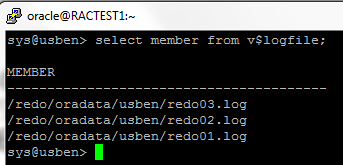
sys@usben>  select member from v$logfile;

MEMBER
--------------------------------------------------
/redo/oradata/usben/redo03.log
/redo/oradata/usben/redo02.log
/redo/oradata/usben/redo01.log
+DATA/USBEN/ONLINELOG/group_4.305.903942885
+DATA/USBEN/ONLINELOG/group_5.307.903942893

6 rows selected.

sys@usben>

Let us manually drop the file system redo*.log files

sys@usben> alter database drop logfile group 1;

Database altered.

sys@usben> alter database drop logfile group  2;

Database altered.

sys@usben> alter database drop logfile group 3;
alter database drop logfile group 3
*
ERROR at line 1:
ORA-01623: log 3 is current log for instance usben (thread 1) - cannot drop
ORA-00312: online log 3 thread 1: '/redo/oradata/usben/redo03.log'

sys@usben>

mmhh.. It is not letting us to drop the group# 3

sys@usben> select status from v$log where GROUP#=3;

STATUS
----------------
CLEARING_CURRENT

1 row selected.

sys@usben>

sys@usben> alter database clear unarchived logfile group 3;
alter database clear unarchived logfile group 3
*
ERROR at line 1:
ORA-00344: unable to re-create online log '/redo/oradata/usben/redo03.log'
ORA-27040: file create error, unable to create file
Linux-x86_64 Error: 2: No such file or directory
Additional information: 1

sys@usben>

Let us rename the file...

sys@usben> alter database rename file
'/redo/oradata/usben/redo03.log' to
'+DATA/USBEN/ONLINELOG/redo03.log';   

Database altered.

sys@usben>

sys@usben> select member from v$logfile;

MEMBER
--------------------------------------------------
+DATA/USBEN/ONLINELOG/redo03.log
+DATA/USBEN/ONLINELOG/group_4.305.903942885
+DATA/USBEN/ONLINELOG/group_5.307.903942893

4 rows selected.

sys@usben>

ASMCMD> ls -l ONLINELOG
Type       Redund  Striped  Time             Sys  Name
ONLINELOG  UNPROT  COARSE   FEB 16 07:00:00  Y    group_4.305.903942885
ONLINELOG  UNPROT  COARSE   FEB 16 07:00:00  Y    group_5.307.903942893
ASMCMD>

sys@usben> alter database drop logfile group 3;
alter database drop logfile group 3
*
ERROR at line 1:
ORA-01623: log 3 is current log for instance usben (thread 1) - cannot drop
ORA-00312: online log 3 thread 1: '+DATA/USBEN/ONLINELOG/redo03.log'


sys@usben> alter database open resetlogs;
alter database open resetlogs
*
ERROR at line 1:
ORA-00392: log 3 of thread 1 is being cleared, operation not allowed
ORA-00312: online log 3 thread 1: '+DATA/USBEN/ONLINELOG/redo03.log'

sys@usben> alter database clear unarchived logfile group 3;

Database altered.

sys@usben> alter database drop logfile group 3;
alter database drop logfile group 3
*
ERROR at line 1:
ORA-01623: log 3 is current log for instance usben (thread 1) - cannot drop
ORA-00312: online log 3 thread 1: '+DATA/USBEN/ONLINELOG/redo03.log'


sys@usben> alter database open resetlogs;

Database altered.

sys@usben> alter database drop logfile group 3;
alter database drop logfile group 3
*
ERROR at line 1:
ORA-01623: log 3 is current log for instance usben (thread 1) - cannot drop
ORA-00312: online log 3 thread 1: '+DATA/USBEN/ONLINELOG/redo03.log'


sys@usben> alter database clear unarchived logfile group 3;
alter database clear unarchived logfile group 3
*
ERROR at line 1:
ORA-01624: log 3 needed for crash recovery of instance usben (thread 1)
ORA-00312: online log 3 thread 1: '+DATA/USBEN/ONLINELOG/redo03.log'

Let us bounce the DB and try again

sys@usben> shutdown immediate
Database closed.
Database dismounted.
ORACLE instance shut down.
sys@usben> startup nomount pfile=$ORACLE_HOME/dbs/initusben.ora
ORACLE instance started.

Total System Global Area  281018368 bytes
Fixed Size                  2923440 bytes
Variable Size             222299216 bytes
Database Buffers           50331648 bytes
Redo Buffers                5464064 bytes
sys@usben> alter database mount;

Database altered.

sys@usben> alter database clear unarchived logfile group 3;

Database altered.

sys@usben> alter database drop logfile group 3;

Database altered.

sys@usben> alter database open;

Database altered.

sys@usben>

sys@usben>  select member from v$logfile;

MEMBER
--------------------------------------------------
+DATA/USBEN/ONLINELOG/group_4.305.903942885
+DATA/USBEN/ONLINELOG/group_5.307.903942893

3 rows selected.


Step 10  Create the temp file.

sys@usben> select file_name from dba_temp_files;
select file_name from dba_temp_files
                      *
ERROR at line 1:
ORA-01157: cannot identify/lock data file 202 - see DBWR trace file
ORA-01110: data file 202: '/temp/oradata/usben/temp01.dbf'


sys@usben> create temporary tablespace temp1 tempfile '+DATA'
size 10m;
  2

Tablespace created.

sys@usben> sys@usben> alter database default temporary tablespace temp1;

Database altered.

sys@usben> drop tablespace temp including contents and datafiles;

Tablespace dropped.

sys@usben> select file_name from dba_temp_files;

FILE_NAME
--------------------------------------------------------------------------------
+DATA/USBEN/TEMPFILE/temp1.310.903945085

1 row selected.

sys@usben>

Step 11   Create the spfile in ASM disk.  We could do this step at the beginning too.  However, i do this step at the end for my convenience. 


sys@usben> show parameter spfile;

NAME                                 TYPE        VALUE
------------------------------------ ----------- ------------------------------
spfile                               string
-- Creating spfile in ASM disk
sys@usben> create spfile='+DATA/USBEN/PARAMETERFILE/spfileusben.ora' from PFILE;

File created.

sys@usben> !

-- Here i updated the parameter file to point to SPFILE in ASM disk.

[oracle@RACTEST1 dbs]$ cat initusben.ora
SPFILE='+DATA/USBEN/PARAMETERFILE/spfileusben.ora'
[oracle@RACTEST1 dbs]$
-- Restart the database with spfile.
sys@usben> shutdown immediate
Database closed.
Database dismounted.
ORACLE instance shut down.
sys@usben> startup
ORACLE instance started.

Total System Global Area  281018368 bytes
Fixed Size                  2923440 bytes
Variable Size             222299216 bytes
Database Buffers           50331648 bytes
Redo Buffers                5464064 bytes
Database mounted.
Database opened.
sys@usben> show parameter spfile

NAME                                 TYPE        VALUE
------------------------------------ ----------- ------------------------------
spfile                               string      +DATA/USBEN/PARAMETERFILE/spfileusben.ora

sys@usben>


Step 12   Verify all the files and make sure all files are moved to ASM disk. Also watch out the alert log for a while. Create the listener and make sure able to connect outside the database server.

Now the database is successfully restored in different host. The database is also migrated to ASM disk as part of restore.

Enjoy reading my blog!!